 Cookie Manager
For Chrome and Brave


Cookies, right
in your toolbar.
Search, edit, and organize the current site’s cookies from a single browser popup.
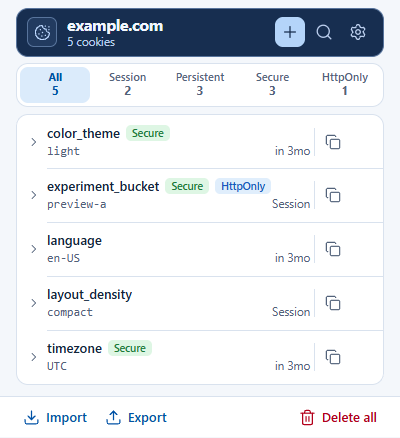
A closer look at the popup.
Find cookies by name, value, or domain. Filter by session, persistent, Secure, or HttpOnly.
One cookie.
One quick edit.
Open a row to change its value, expiry, or flags. If you delete a cookie by mistake, use Undo.

Find the right one
Search the current site and narrow the list with live filter counts.

Undo a deletion
Restore a cookie after deleting it. Deleting all asks you to confirm.
color_theme=lightFind what you need faster.
Filter the active site
See counts for session, persistent, Secure, and HttpOnly cookies as you narrow the list.
Review changes in place
Expand a row to review its name, value, expiration, and SameSite setting before saving.
Choose your workspace
Pick a light or dark theme, an accent color, and a sort order that suits your list.
Bring your cookies with you.
Import and export in the format your workflow uses. On import, Cookie Manager recognizes the format automatically.
- JSON
- Keep the cookie fields and flags for a later re-import.
- Cookie header
- Use a compact
name=valuestring. - cookies.txt
- Use the standard Netscape text format.
Local by design.
Cookie Manager uses the browser’s cookies API. It has no analytics or telemetry and saves only your preferences in extension storage.
Ready in three steps.
Full install guideDownload and unzip
Grab the ZIP from GitHub Releases and extract it.
Open Extensions
Visit
chrome://extensionsorbrave://extensionsand turn on Developer mode.Load the folder
Click Load unpacked and choose the folder containing
manifest.json.
Good to know.
Which browsers does it support?
Cookie Manager supports desktop Chrome and Brave. The release ZIP is installed as an unpacked extension.
Why does it ask for access to websites?
Chrome requires host access so the cookies API can read and edit cookies for the active site.
Can I restore a deleted cookie?
Use the Undo action in the confirmation message after you delete it.